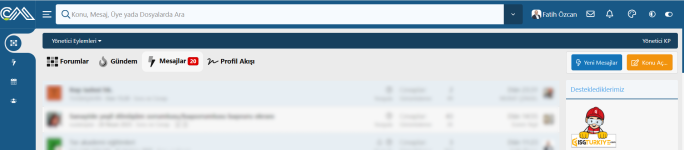
@Painbaker Could you please consider showing unread item number for each tab instead of showing total number? I think unread posts will make more sense for this addon.


![[XB] Content Feeds](/data/resource_icons/0/5.jpg?1732483589)
- Added front-end filters for News Feed tab
- Added Featured Content tab
- Added Trending Content tab
- Added default icon for newly created tabs
- Added simple display style for Threads tab
- Added option to count only unread items in total counters for Threads and Media tabs
- Fixed auto-refresh functionality for tabs embedded in the forum list
Added.Could you please consider showing unread item number for each tab instead of showing total number?

Amazing @Painbaker I will update my Addon in my first opportunity.Added.
View attachment 2510
This option can only be applied to content that registers viewing content (here currently only threads and media items).
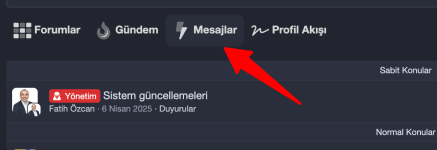
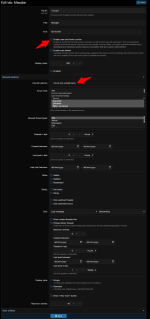
I forgot to change user group setting. it is ok now.@Painbaker Is there anyting additional I should do? My settings are as follows but counter is not displaying.
The following tabs is thread type showing last messages.
View attachment 2514
View attachment 2513
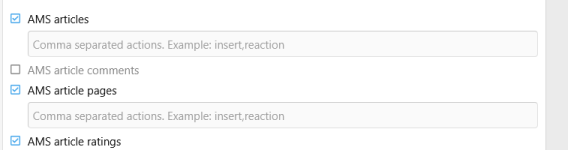
XF does not have a scratch table or any universal interface for the watched content to make this work for everything.Is there any way that "Only Watched Content" could be added to the New Feed? I know there is the option in threads for watched threads/watched forums, but could it be done in the news feed for all content you watch?
Or is there an action that can be added here (I don't understand this bit lol)
View attachment 2552
Ah, okay. ThanksXF does not have a scratch table or any universal interface for the watched content to make this work for everything.
Within the scope of this add-on I can only add filter support for each type of content individually.
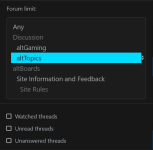
Fix: News Feed filter options were not marked as checked
Fix: show only listable nodes in news feed filter
Should be fixed in the latest patchThis add-on is way more complex than I initially thought when I purchased it. It's incredible what you can do with it.
I have do have couple slight issue with the news feed user filter though. It seems to have session caching for the filter and will remember user selection, which is good.
However, some of the selections on the filter do not "appear" to be saved even though in the actual feed they are.
View attachment 2593
For example, visually it will remember forum selection, but there is no "check" on unread threads even though the feed IS filtering unread threads. This is true for watched threads, unread threads, and unanswered threads.
If you could make sure that those 3 filter options at the bottom remain checked upon refresh like the other filter options, that would be awesome.
The other issue, is that it does not seem to respect forums with "Display in the node list" unchecked. For example, "Site Rules" is not visible on the forum list but is visible in the filter menu.
Thanks for your time!
Should be fixed in the latest patch
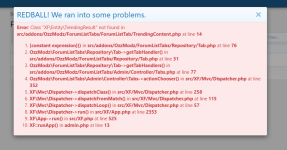
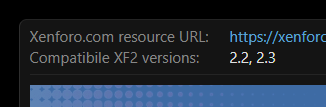
Trending content was introduced in XF2.3 (as was featured content)@Painbaker we just installed, and running into this error when attempting to add a tab. We are still on XF 2.2 btw.
Ahh, am I crap out of luck then? I was under the impression this addon was compatible with 2.2Trending content was introduced in XF2.3 (as was featured content)
Fix: missing sort options for featured content handler
Fix: avoid throwing "Class X not found" for XF 2.3 tabs on XF 2.2
Error: Template public:ozzmodz_flt_tab_pane error: Call to a member function getContent() on null src/addons/OzzModz/ForumListTabs/ForumListTab/TrendingContent.php:91
Generated by: Matthew Jun 24, 2025 at 10:21 PM

Stack trace

#0 src/addons/OzzModz/ForumListTabs/ForumListTab/AbstractHandler.php(126): OzzModz\ForumListTabs\ForumListTab\TrendingContent->getTemplateParams()
#1 src/addons/OzzModz/ForumListTabs/Entity/Tab.php(102): OzzModz\ForumListTabs\ForumListTab\AbstractHandler->render()
#2 src/XF/Template/Templater.php(1282): OzzModz\ForumListTabs\Entity\Tab->render()
#3 internal_data/code_cache/templates/l1/s3/public/ozzmodz_flt_tab_pane.php(10): XF\Template\Templater->method(Object(OzzModz\ForumListTabs\Entity\Tab), 'render', Array)
#4 src/XF/Template/Templater.php(1799): XF\Template\Templater->{closure}(Object(NF\Tickets\XF\Template\Templater), Array, NULL)
#5 src/XF/Template/Template.php(24): XF\Template\Templater->renderTemplate('ozzmodz_flt_tab...', Array)
#6 src/XF/Mvc/Renderer/Json.php(86): XF\Template\Template->render()
#7 src/XF/Mvc/Renderer/Json.php(70): XF\Mvc\Renderer\Json->renderHtmlFallback('OzzModz\\ForumLi...', 'public:ozzmodz_...', Array)
#8 src/XF/Mvc/Dispatcher.php(471): XF\Mvc\Renderer\Json->renderView('OzzModz\\ForumLi...', 'public:ozzmodz_...', Array)
#9 src/XF/Mvc/Dispatcher.php(453): XF\Mvc\Dispatcher->renderView(Object(XF\Mvc\Renderer\Json), Object(XF\Mvc\Reply\View))
#10 src/XF/Mvc/Dispatcher.php(412): XF\Mvc\Dispatcher->renderReply(Object(XF\Mvc\Renderer\Json), Object(XF\Mvc\Reply\View))
#11 src/XF/Mvc/Dispatcher.php(66): XF\Mvc\Dispatcher->render(Object(XF\Mvc\Reply\View), 'json')
#12 src/XF/App.php(2826): XF\Mvc\Dispatcher->run()
#13 src/XF.php(806): XF\App->run()
#14 index.php(23): XF::runApp('XF\\Pub\\App')
#15 {main}

Request state

array(4) {
  ["url"] => string(133) "/forum-list-tabs/trending?_xfResponseType=json&_xfWithData=1&_xfRequestUri=%2F&_xfToken=1750821699%2Ca7e53ea1c3e734a3d39763746c73ccaf"
  ["referrer"] => string(22) "https://xyz.com/"
  ["_GET"] => array(4) {
    ["_xfResponseType"] => string(4) "json"
    ["_xfWithData"] => string(1) "1"
    ["_xfRequestUri"] => string(1) "/"
    ["_xfToken"] => string(43) "1750821699,a7e53ea1c3e734a3d39763746c73ccaf"
  }
  ["_POST"] => array(0) {
  }
}Working great now - thanks!!Painbaker updated [XB] Forum Content List Tabs with a new update entry:
2.0.5 Patch Level 2
Read the rest of this update entry...
Hi @Painbaker
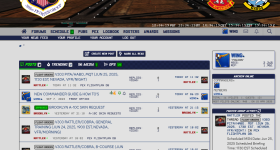
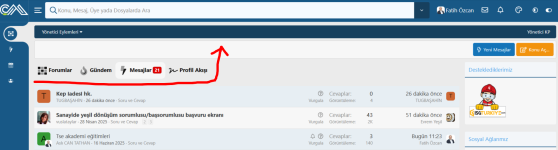
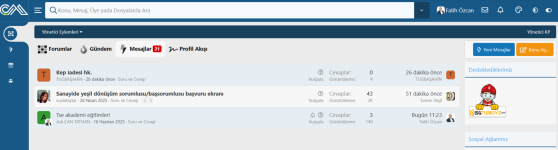
I am not fan of breadcrumb at the homepage. So I am hiding it at the homepage. My question is regarding tab locations, how can I move the tabs as in the images below? Can you direct me for correct template modifications maybe?
View attachment 2620
I want to narrow the New Thread and Recent Posts button area and move the tabs up and in line with it.
View attachment 2621
[data-template="forum_list"] .p-body-header {
  display: none;
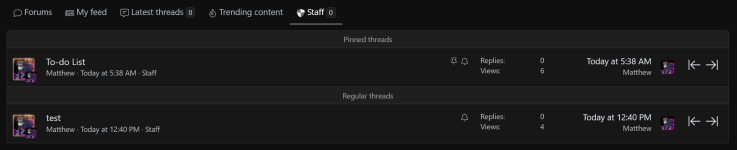
}Would you consider adding in-line moderator tools to the latest thread tabs at some point down the road? I discovered you can use the latest thread tab and limit it to one forum to basically use that tab as an entire forum. Great for staff forums or group exclusive (VIP) forums that you don't want crowding up the main forum list.
Seems like one of your featured content add-on has been deleted or disabled, but it still has a Featured record.Edit: Encountered this server error:
Code:Error: Template public:ozzmodz_flt_tab_pane error: Call to a member function getContent() on null src/addons/OzzModz/ForumListTabs/ForumListTab/TrendingContent.php:91 Generated by: Matthew Jun 24, 2025 at 10:21 PM Stack trace #0 src/addons/OzzModz/ForumListTabs/ForumListTab/AbstractHandler.php(126): OzzModz\ForumListTabs\ForumListTab\TrendingContent->getTemplateParams() #1 src/addons/OzzModz/ForumListTabs/Entity/Tab.php(102): OzzModz\ForumListTabs\ForumListTab\AbstractHandler->render() #2 src/XF/Template/Templater.php(1282): OzzModz\ForumListTabs\Entity\Tab->render() #3 internal_data/code_cache/templates/l1/s3/public/ozzmodz_flt_tab_pane.php(10): XF\Template\Templater->method(Object(OzzModz\ForumListTabs\Entity\Tab), 'render', Array) #4 src/XF/Template/Templater.php(1799): XF\Template\Templater->{closure}(Object(NF\Tickets\XF\Template\Templater), Array, NULL) #5 src/XF/Template/Template.php(24): XF\Template\Templater->renderTemplate('ozzmodz_flt_tab...', Array) #6 src/XF/Mvc/Renderer/Json.php(86): XF\Template\Template->render() #7 src/XF/Mvc/Renderer/Json.php(70): XF\Mvc\Renderer\Json->renderHtmlFallback('OzzModz\\ForumLi...', 'public:ozzmodz_...', Array) #8 src/XF/Mvc/Dispatcher.php(471): XF\Mvc\Renderer\Json->renderView('OzzModz\\ForumLi...', 'public:ozzmodz_...', Array) #9 src/XF/Mvc/Dispatcher.php(453): XF\Mvc\Dispatcher->renderView(Object(XF\Mvc\Renderer\Json), Object(XF\Mvc\Reply\View)) #10 src/XF/Mvc/Dispatcher.php(412): XF\Mvc\Dispatcher->renderReply(Object(XF\Mvc\Renderer\Json), Object(XF\Mvc\Reply\View)) #11 src/XF/Mvc/Dispatcher.php(66): XF\Mvc\Dispatcher->render(Object(XF\Mvc\Reply\View), 'json') #12 src/XF/App.php(2826): XF\Mvc\Dispatcher->run() #13 src/XF.php(806): XF\App->run() #14 index.php(23): XF::runApp('XF\\Pub\\App') #15 {main} Request state array(4) { ["url"] => string(133) "/forum-list-tabs/trending?_xfResponseType=json&_xfWithData=1&_xfRequestUri=%2F&_xfToken=1750821699%2Ca7e53ea1c3e734a3d39763746c73ccaf" ["referrer"] => string(22) "https://xyz.com/" ["_GET"] => array(4) { ["_xfResponseType"] => string(4) "json" ["_xfWithData"] => string(1) "1" ["_xfRequestUri"] => string(1) "/" ["_xfToken"] => string(43) "1750821699,a7e53ea1c3e734a3d39763746c73ccaf" } ["_POST"] => array(0) { } }
For those interested with this modification,Thank you @Painbaker, good idea indeed. I already implemented and saved more space on the homepage.
View attachment 2626
<div class="p-body-header-sidebar" style="display: flex; justify-content: center; gap: 10px; flex-wrap: wrap;">
    <xf:button href="{{ link('whats-new/posts') }}" class="button--icon button--icon--bolt xtr-nav-link" rel="nofollow">
        <xf:fa icon="bolt fa-fw" />
        <span class="button-text">{{ phrase('new_posts') }}</span>
    </xf:button>

    <xf:if is="$xf.visitor.user_id">
        <xf:button href="{{ link('forums/create-thread') }}" class="button--icon button--icon--write button--cta" overlay="true" rel="nofollow">
            <xf:fa icon="write fa-fw" />
            <span class="button-text">{{ phrase('post_thread...') }}</span>
        </xf:button>
    </xf:if>
</div>
<p>/*** HIDE New Posts and Post Thread Buttons at Forum list ***/
[data-template="forum_list"] .p-body-header {
display: none;
}
/*** HIDE New Posts and Post Thread Buttons at Forum list ***/
/*** SIDEBAR New Posts and Post Thread Button Area Background Style***/
.p-body-header-sidebar
{
color: @xf-textColor;
background: @xf-contentBg;
border: 1px solid @xf-borderColor;
border-radius: @xf-borderRadiusMedium;
padding: @xf-paddingMedium; //Changed Large to Medium
min-height: 50px; /* Adjust height as needed */
}
/*** SIDEBAR New Posts and Post Thread Button Area Background Style***/Please try the new version.I have been noticing inconsistencies with the session caching for this add-on. It seems with guest viewing the tabs will sometimes get stuck.'
My default tab is forums. As a guest, if I click on a different tab, and then back to another tab, it will get stuck on the previous tab I clicked in. Even on fresh reloads or viewing as guest on another device. Could this be looked into?
Please try the new version.
I’ve added an additional tab activation on the JavaScript side. Previously, the tab was activated using a CSS class during page rendering, which meant it was always stuck on the version cached for guests.
If that doesn't work, try 2.0.5 Patch Level 4Preliminary testing looks good. I'll keep monitoring and let you know.
Thank you!

The music thread starter add-on does not have filters by date, as the data is currently stored as a string and the database does not provide for range conditions.I have two forums on my music site using your music add-on. One is for 'Classic Bands' the other for 'Next Gen Bands' could this add-on add tabs to display albums from specific date periods? For example, in the 'Classic Bands' forums create tabs to display albums from 1970 to 1979, albums from 1980 to 1989, albums from 1990 to 1999 etc.
Would this work in the same way for 'Next Gen Bands' with different years from and to?
If you're talking about [cv6] Letter Index, this add-on is not supported yet.Will this also work in conjunction with Hoffi's alphabetical 'Index for forums' add-on?