
You are using an out of date browser. It may not display this or other websites correctly.
You should upgrade or use an alternative browser.
You should upgrade or use an alternative browser.
![[XB] Change Attachment Name](/data/resource_icons/0/51.jpg?1774995160)
[XB] Change Attachment Name [Paid] 2.0.6 Patch Level 4
You must log in or register to purchase ($20.00)
- Thread starter Painbaker
- Start date
Painbaker updated [XB] Change Attachment Name with a new update entry:
2.0.6
Read the rest of this update entry...
2.0.6
View attachment 3923
- Improved attachment container title renaming logic for better compatibility with new XFMG versions
- Added button to quickly rename attachment name for media item
- Added batch attachment rename tool
Read the rest of this update entry...
Added in latest updateCould the button for changing the name on the XFMG page be added in the same location as the Report, Edit, Delete, etc. buttons? It would be very useful for editing names directly from the gallery.
Please try the latest versionFurthermore, it is random; the extension is not always shown in the XFMG title after renaming the file.
make sure these template modifications applied to your styleWhere is the new edit button in XFMG? I don't see it in my mobile phone
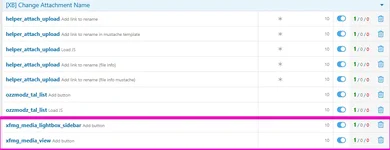
I rebuild the addon but:

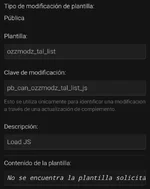
Last edited:
Thes e modifications that were not applied are designed for another add-on
@Paninbaker Have you had a chance to look at it? The downloadable file is missing templates needed to apply the changes.
just checked, and and it works for me ("rename attachment" collapsed into in the menu under three dots on mobile viewport)
@Painbaker The extension error persists. While it doesn't appear in the media gallery attachment, it is displayed in the media gallery page title.
Painbaker updated [XB] Change Attachment Name with a new update entry:
2.0.6 Patch Level 1
Read the rest of this update entry...
2.0.6 Patch Level 1
Fix: Ensure attachment extension is removed for container title
Feature: separate option to keep attachment extension in container title on attachment renaming
Read the rest of this update entry...
Please try new patch@Painbaker The extension error persists. While it doesn't appear in the media gallery attachment, it is displayed in the media gallery page title.
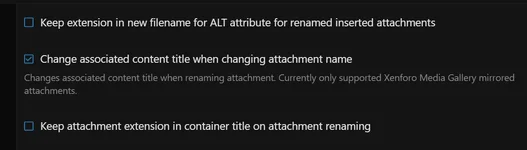
Painbaker updated [XB] Change Attachment Name with a new update entry:
2.0.6 Patch Level 2
Read the rest of this update entry...
2.0.6 Patch Level 2
Fix: properly update mirrored media title when renaming attachment from post
Read the rest of this update entry...
I tried with 3 atachments, editing the name from the thread, and the media gallery title again includes .webp.
please try the latest patch
If that doesn't work either, I have no idea what the problem might be
do you have any other add-ons installed that modify media titles?
please try the latest patch
If that doesn't work either, I have no idea what the problem might be
do you have any other add-ons installed that modify media titles?
I uninstalled the old version to delete all the data. With the new patch, it seems to be working correctly, thanks!
However, the button to edit the gallery name has disappeared.
Last time I display the button by uninstalling and reinstalling the add-on. This time it doesn't work even after doing that.
In fact, I've disabled all add-ons except the one for renaming attachments and XFMG, and the button still doesn't appear. Only works if I replace the second conditional:
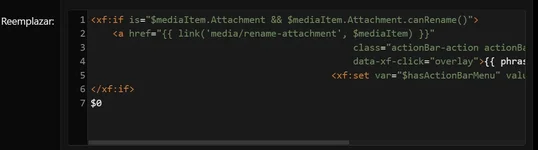
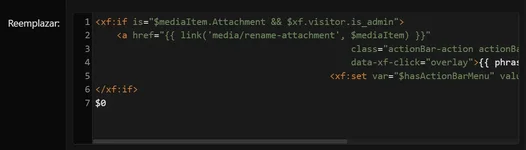
In fact, I've disabled all add-ons except the one for renaming attachments and XFMG, and the button still doesn't appear. Only works if I replace the second conditional:
Last edited:
Painbaker updated [XB] Change Attachment Name with a new update entry:
2.0.6 Patch Level 3
Read the rest of this update entry...
2.0.6 Patch Level 3
Fix: added permission check method directly to media item entity to avoid calling Attachment Data relation
Read the rest of this update entry...
i have no idea why this is happeningI give up... the add-on keeps showing .webp in the XFMG page name
tried a bunch of ways to do this on my test environment
the file extension always gets removed from media item when I rename the attachment
I added a permission checking method directly to media item this might help resolve this issueLast time I display the button by uninstalling and reinstalling the add-on. This time it doesn't work even after doing that.
In fact, I've disabled all add-ons except the one for renaming attachments and XFMG, and the button still doesn't appear. Only works if I replace the second conditional:
View attachment 3949
View attachment 3950
i have no idea why this is happening
tried a bunch of ways to do this on my test environment
the file extension always gets removed from media item when I rename the attachment
I think in my case the problem only occurs when I edit the attachment name from the thread and not from the media file. I'll try this latest version, thanks!
We should get our terminology right. There is a difference between the actual file name and the XFMG image title (in the XFMG gallery). The XFMG image title follows the filename, but is independent of it, meaning that if we change the XFMG image title the filename doesn't change. So they're two different things.
When I change the filename on the board, in a post, the .webp extension shows in the filename both on the board and in the XFMG metadata block. And it also shows in the XFMG image title.
But when I click on EDIT and change the file name in a post on the board, the extension does still show in the filename (happy with the) but does not show in the XFMG image title. So for my own posts, I just post my image, then edit my post to change the filename, click on CANCEL and then all is well, no extension in the XFMG image title.
I'm happy with the add-on.
When I change the filename on the board, in a post, the .webp extension shows in the filename both on the board and in the XFMG metadata block. And it also shows in the XFMG image title.
But when I click on EDIT and change the file name in a post on the board, the extension does still show in the filename (happy with the) but does not show in the XFMG image title. So for my own posts, I just post my image, then edit my post to change the filename, click on CANCEL and then all is well, no extension in the XFMG image title.
I'm happy with the add-on.
Do what I do: post your image in the post, click on Edit, edit the filename, click on Cancel. That removes the .webp extension from the title in the XFMG gallery.It's impossible, the extension keeps appearing in the XFMG image title

Do what I do: post your image in the post, click on Edit, edit the filename, click on Cancel. That removes the .webp extension from the title in the XFMG gallery.
But then I don't rename the attachments; I need to do both.
@Painbaker
Painbaker, I have a request.
So, I also change the alt text for some images, especially when in the gear section. So then I need to put in two different types of strings as the alt text should be with capitals and spaces (regular text basically) but the filename needs to all be lowercase and hyphenated. That's no problem as I can checkmark the "Keep custom alt attributes" option. But it would be awfully nice if I could make that the default setting, or if it remembers the last setting. So I don't have to check that option for each image.
Painbaker, I have a request.
So, I also change the alt text for some images, especially when in the gear section. So then I need to put in two different types of strings as the alt text should be with capitals and spaces (regular text basically) but the filename needs to all be lowercase and hyphenated. That's no problem as I can checkmark the "Keep custom alt attributes" option. But it would be awfully nice if I could make that the default setting, or if it remembers the last setting. So I don't have to check that option for each image.